
Transform Your Business with Cloud Deployment Services
Want to Enjoy a Cost-Efficient and Risk-Free Cloud Journey?

Optimizing Your Cloud Strategy
Seamless Cloud Integration for Your Business
With Sherdil Cloud, your transition to cloud deployment is smooth and efficient. We handle everything from planning to execution, ensuring minimal disruption to your operations. Our team of experts collaborates with you to design a cloud strategy that aligns with your business goals and maximizes your IT investments.
Comprehensive Cloud Deployment Models for Diverse Needs
Our services encompass various cloud deployment models, including Public Cloud, Private Cloud, Hybrid Cloud, and Multi-Cloud. Each model offers unique advantages, from cost savings and scalability to enhanced security and flexibility. By understanding your specific requirements, we recommend the optimal deployment model to support your growth and innovation.
Maximizing Efficiency with Public Cloud Solutions
Harness the Power of Public Cloud Services
Public cloud deployment offers unparalleled scalability, flexibility, and cost-efficiency for businesses of all sizes. At Sherdil Cloud, we leverage leading public cloud platforms such as AWS to deliver robust cloud solutions tailored to your needs. Our public cloud services ensure high availability, easy scalability, and reduced IT overheads. By utilizing public cloud resources, you can focus on your core business activities while enjoying the benefits of a fully managed cloud environment. Our team ensures seamless integration and optimal performance, enabling you to achieve your business objectives efficiently.
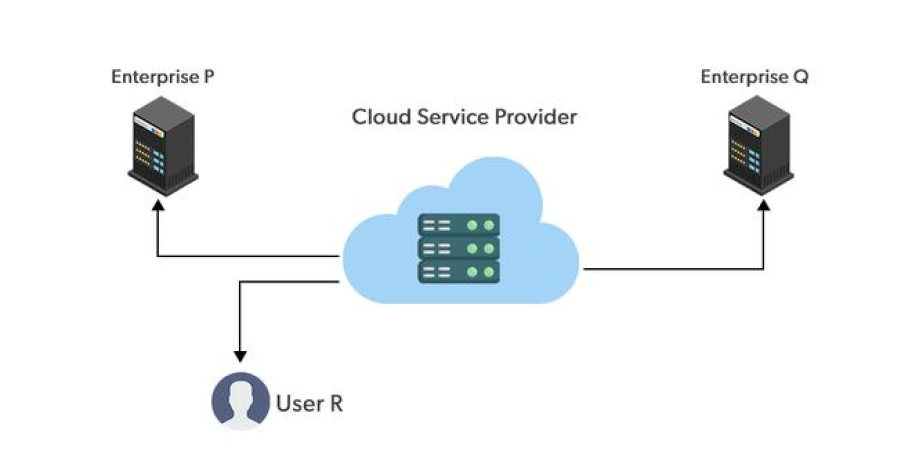
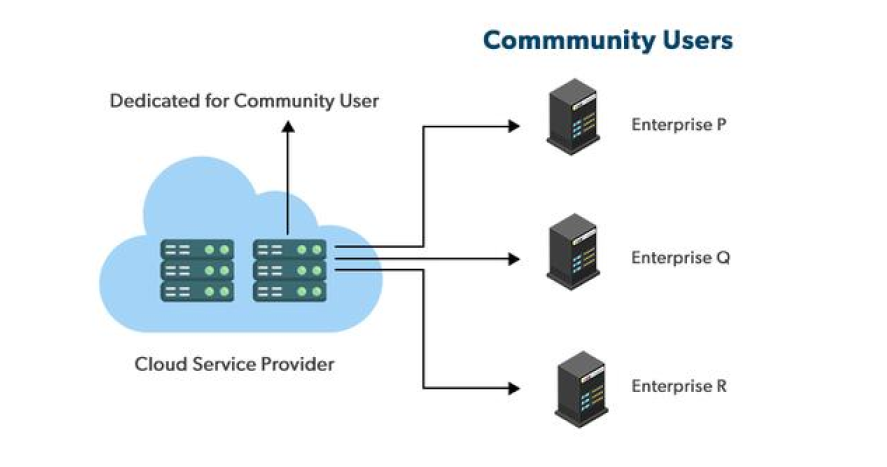
Advantages of the Hybrid Cloud Model
Flexibility and Control
Hybrid Cloud offers the perfect balance of flexibility and control. Integrate public and private cloud resources to meet your unique business needs.
Enhanced Security
Benefit from enhanced security with a Hybrid Cloud model. Protect sensitive data in a private cloud while leveraging the scalability of public cloud services.
Cost Efficiency
Achieve cost efficiency by utilizing the Hybrid Cloud. Optimize resource usage and reduce expenditures by combining public and private cloud resources effectively.
CI/CD Pipelines, Blue/Green & Canary Deployment
CI/CD Pipeline Design: Automating Your Software Delivery
Continuous Integration and Continuous Deployment (CI/CD) is the backbone of modern software delivery. A CI/CD pipeline automates the entire journey of your code from the moment a developer commits a change to the moment it is running in production. At Sherdil Cloud, we design and implement custom CI/CD pipelines using industry-leading tools tailored to your team’s workflow.
Our CI/CD pipelines include automated code compilation, unit testing, and integration testing triggered on every code commit; security scanning using SonarQube for code quality, Snyk for dependency vulnerabilities, and Trivy for container image scanning; automated artifact creation and registry management using Amazon ECR, Docker Hub, or JFrog Artifactory; staged deployments through development, staging, and production environments with approval gates for production releases; and automated rollback on failure triggered by health checks and error rate thresholds.
We build pipelines using Jenkins (the most flexible, self-hosted option), GitLab CI/CD (ideal for GitLab users), GitHub Actions (best for GitHub repositories), or AWS CodePipeline with CodeDeploy (native AWS integration). Every pipeline is defined as code, stored in version control, and fully reproducible.
Blue/Green Deployment: Zero-Downtime Releases
Blue/green deployment is a release strategy that eliminates downtime and dramatically reduces release risk. You maintain two identical production environments (called blue and green). At any point, one environment serves all live traffic while the other sits idle. When releasing a new version, you deploy it to the idle environment, run automated tests, and then switch the load balancer to direct all traffic to the updated environment. If anything goes wrong, you switch back in seconds.
We implement blue/green deployments using AWS Elastic Beanstalk environment swaps, Application Load Balancers with weighted target groups, or Kubernetes with Istio service mesh for granular traffic control.
Canary Deployments: Gradual, Risk-Controlled Releases
Canary deployment takes a more gradual approach. Instead of switching 100% of traffic at once, you route a small percentage (typically 5–10%) to the new version while monitoring error rates, latency, and business metrics. If the canary performs well, traffic is gradually increased to 25%, then 50%, then 100%. If issues are detected at any stage, traffic automatically routes back to the stable version. We implement canary deployments using AWS CodeDeploy with traffic shifting, Kubernetes with Flagger, or Istio traffic management policies.
Our Cloud Deployment Process
Phase 1: Deployment Assessment (1 week)
We document your current deployment workflow step-by-step, identify manual bottlenecks, measure deployment frequency and lead time, assess current testing coverage, and define the target state.
Phase 2: Pipeline Architecture Design (1–2 weeks)
We design the CI/CD pipeline including tool selection (Jenkins, GitLab CI, GitHub Actions, or AWS CodePipeline), stage definitions, testing strategy, security scanning integration, approval workflows, deployment strategy (rolling, blue/green, or canary), and rollback procedures.
Phase 3: Pipeline Development (2–4 weeks)
We build the pipeline, integrate it with your source code repository, configure automated testing suites, set up security scanning, configure deployment targets across environments, and implement monitoring for pipeline health and deployment metrics.
Phase 4: Validation & Training (1–2 weeks)
We run the pipeline through multiple deployment cycles with your team, validate rollback procedures under realistic conditions, and train your developers and operations team on pipeline operations, troubleshooting, and best practices.
Phase 5: Production Go-Live & Ongoing Support
We switch production deployments to the new automated pipeline, closely monitor the first several releases, and provide ongoing support for pipeline maintenance, tool upgrades, and workflow enhancements.
Proven Results Across Industries
Numbers that reflect our commitment to excellence
Projects Delivered
Professionals Trained
Enterprise Clients
%
SLA Guarantee
Our Partnerships & Certifications
Trusted by Global Cloud & Industry Leaders



Trusted by Industry Leaders
Serving Pakistan, UAE & USA Enterprises











Get Started with Sherdil Cloud

Elevate Your IT Infrastructure Today
BLOG CONTINUOUS INTEGRATION AND CONTINUOUS DELIVERY
Recommended Reading
Learn how containerization simplifies application deployment with Docker and Kubernetes.
Explore more about Cloud Migration Services
Learn more about Cloud Infrastructure & Automation
CLOUD DEPLOYMENT FAQ’s